 Seller Playbook
AI Background Remover for Product Photos: A Seller’s Guide
By Muhammad Nadeem · Blog #27
📖 6 min read · 1,232 words
# The Product Was Ready. The Photo Was Costing Her Sales.
Sara had spent weeks choosing the right product.
It was useful, well-priced and carefully packaged. She uploaded it to her online store, published the listing and waited.
People viewed the page—but very few purchased.
She changed the title. She reduced the price. She added more keywords.
Nothing made a meaningful difference.
Then a friend asked one simple question:
“Would you trust this product if you saw only this photo?”
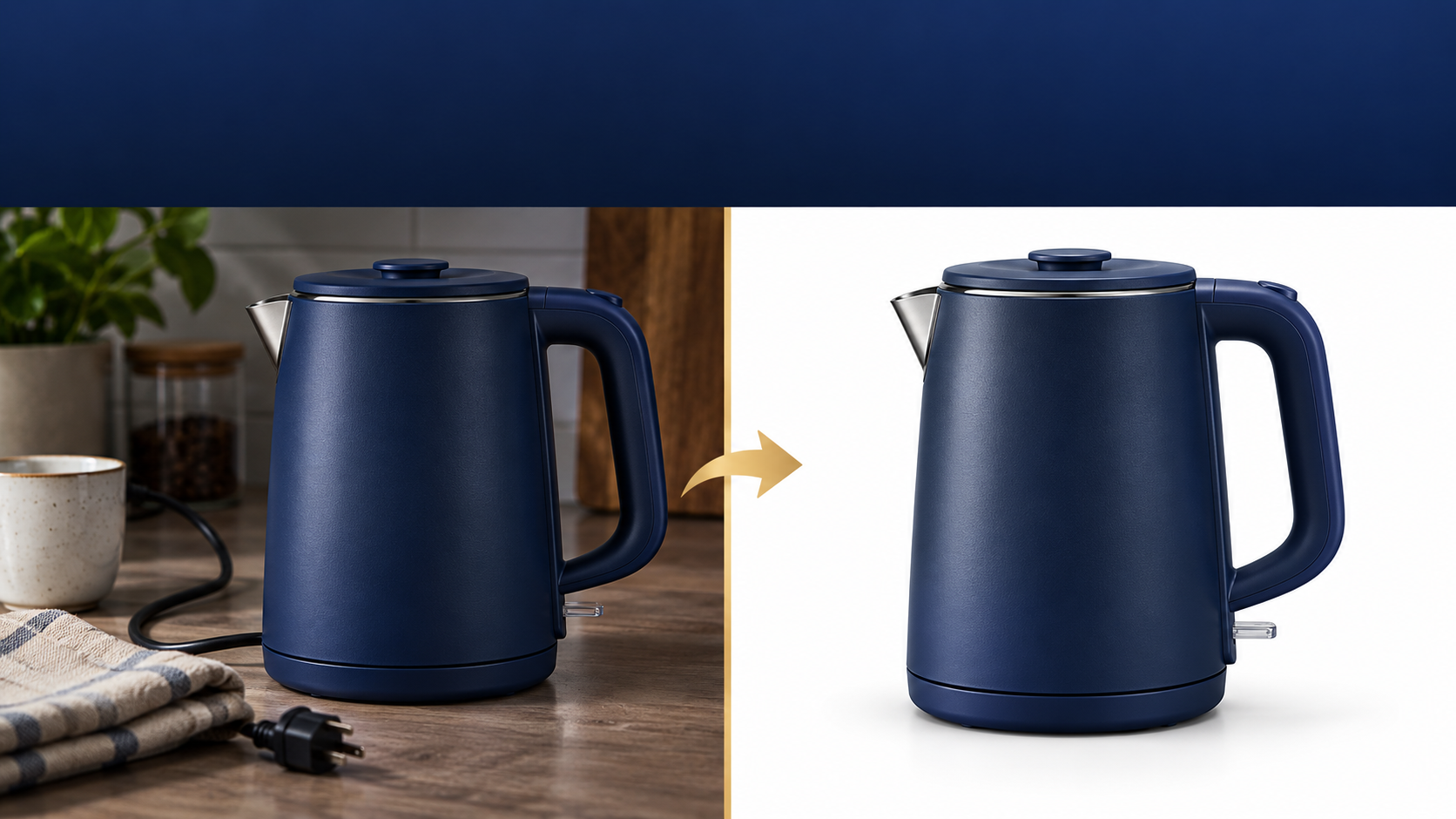
Sara looked again. The product was photographed on a kitchen table. A cable crossed the background, the lighting was uneven and the item appeared smaller than it really was.
The product was not the problem.
The presentation was.
Sara is a fictional character representing a common challenge faced by online sellers.
Buyers See the Image Before They Read the Description
Online shoppers cannot hold a product, inspect its finish or judge its size in person. The product photo becomes their first experience of the item.
A distracting background can make a valuable product feel ordinary. A clean image, however, helps the buyer understand what is being sold within seconds.
The first-impression test
| Ask yourself | Why it matters |
|---|---|
| Is the product immediately recognizable? | Buyers should not need to search the image |
| Is the background clean? | Visual clutter competes with the product |
| Are the real color and shape preserved? | Accuracy reduces confusion and returns |
| Is the product large enough to inspect? | Tiny products are difficult to evaluate |
| Does the image feel consistent with the store? | Consistency builds confidence |
🟡 Quick lesson: A polished product photo should improve presentation—not change the real product.
Sara’s Five-Minute Product Photo Workflow
Instead of arranging another photoshoot, Sara selected the clearest original photo from her phone.
Her workflow looked like this:
📷 Original photo
Uneven background, ordinary lighting and unnecessary objects
↓
✂️ Remove the background
Separate the real product from the distracting surroundings
↓
✨ Improve the presentation
Enhance clarity while preserving the product’s genuine details
↓
📐 Prepare the correct size
Create versions suitable for different marketplaces and social channels
↓
✅ Review before publishing
Check color, edges, proportions and included accessories
She started with the Azan AI Background Remover, which creates a transparent PNG that can be placed on a clean storefront background, advertisement or social graphic.
For products with more complex edges or styling props, sellers can also use the Smart Background Remover.
Removing the Background Is Only the Beginning
A transparent product cutout gives you flexibility—but it still needs to be used carefully.
Sara placed her product on a clean white background for the main marketplace image. She then prepared a softer branded version for social media.
She avoided:
- Adding accessories that were not included
- Changing the product’s real color
- Making the item appear larger than its actual proportions
- Hiding scratches, labels or important physical details
- Using promotional text on the primary marketplace image
The goal was not to create a fantasy product.
The goal was to show the real product clearly.
One Product Photo Can Serve Several Channels
The same image should not simply be uploaded everywhere without preparation. Different channels present images in different shapes and contexts.
| Channel | Recommended visual purpose |
|---|---|
| Amazon or Noon | Clear main product image with minimal distraction |
| Shopify | Main product image plus lifestyle and detail views |
| Etsy | Attractive thumbnail supported by informative secondary images |
| Branded square or vertical promotional composition | |
| Vertical image designed to communicate the benefit quickly | |
| Clean promotional image with sufficient mobile readability |
Sara used the Azan AI Product Image Studio to resize and prepare her image for different selling channels.
This helped her turn one useful source photo into a more consistent collection of marketplace assets.
What Changed After the Photo Changed?
Sara did not change the product.
She did not invent new features or make unrealistic promises.
She improved the way buyers experienced the product online.
The new listing looked cleaner. The product was easier to understand. Her social posts felt more professional, and the store finally looked like one connected brand instead of a collection of unrelated images.
That is the real value of an efficient product-photo workflow:
- Faster listing preparation
- More consistent storefront presentation
- Reusable images for marketplaces and social media
- Fewer distracting visual elements
- A clearer buying experience
A better image cannot guarantee sales, but it can remove one important reason for buyers to leave.
The 60-Second Product Photo Audit
Before publishing your next product, check the following:
- [ ] The product is sharp and clearly visible
- [ ] The background does not distract from the item
- [ ] The real color, shape and proportions are preserved
- [ ] The complete product is visible
- [ ] No unverified accessory has been added
- [ ] The image is correctly sized for its destination
- [ ] The main image remains simple
- [ ] Secondary images explain details, scale or use
- [ ] The image still looks clear on a mobile screen
- [ ] You compared the final image with the original product
🔵 Practical tip: Always keep the untouched original photograph. Compare it with every edited version before publishing.
When Should You Enhance a Product Photo?
Background removal and photo enhancement solve different problems.
Use a background remover when:
- The surroundings are distracting
- You need a transparent PNG
- You want to place the product in a branded design
- You need a clean marketplace-ready cutout
Use an AI product enhancer when:
- The image looks dull or poorly lit
- The product needs a cleaner studio-style presentation
- You want improved clarity while keeping the item recognizable
You can explore the Azan AI Product Photo Enhancer for this part of the workflow.
Frequently Asked Questions
Can I remove a product-photo background online?
Yes. Upload a supported product image to the Azan AI Background Remover, process it and download the transparent PNG result.
Should every product image have a white background?
A clean background is especially useful for a main marketplace image. Secondary images can include lifestyle settings, dimensions, features and use cases—provided they represent the product accurately.
Can AI improve a blurry product photo?
AI may improve clarity and presentation, but it cannot reliably recover every missing detail. Start with the clearest, highest-resolution original available.
Can I use the same image for Amazon, Noon, Etsy and Shopify?
You can begin with the same source photograph, but each channel may benefit from different dimensions, crops and supporting images. Use the Product Image Studio to prepare appropriate versions.
Will better product photos guarantee higher sales?
No single tool can guarantee sales. Pricing, demand, reviews, delivery, competition and listing quality also matter. Better photos help buyers understand the product and make a more confident decision.
Your Next Step
Choose one product listing that receives views but not enough sales.
Look at its first image as if you were seeing the product for the first time.
Is the value immediately clear—or is the background telling a louder story than the product?
Start with one image. Remove the distraction. Preserve the truth. Present the product clearly.
Azan AI community
Join the Conversation
Was this guide useful?
Comments
Have a question or an idea to add? Share it with the Azan AI community.
Loading comments…
Reference: Blog #27 — quote this number if you contact us about this article