 Seller Playbook
AI Product Photo Enhancer: Improve Images Safely
By Muhammad Nadeem · Blog #31
📖 9 min read · 1,914 words
# AI Product Photo Enhancer: Improve Images Without Changing the Product
A customer cannot hold your product before buying it online. They judge its quality through the images you provide.
Unfortunately, many sellers work with blurry supplier photos, poor lighting, dull colors, distracting backgrounds, or images taken quickly with a phone. An AI product photo enhancer can improve these photos—but only when it preserves the real product.
The goal is not to make the product look better than it really is. The goal is to present the same product more clearly, accurately, and professionally.
This guide explains how Amazon, Noon, Shopify, and Etsy sellers can enhance product images with AI without misleading customers or creating costly listing problems.
What Does an AI Product Photo Enhancer Do?
An AI product photo enhancer analyzes an existing photograph and improves common quality issues such as:
- Weak or uneven lighting
- Slight blur or softness
- Low contrast
- Digital noise and grain
- Dull presentation
- Poor white balance
- Unprofessional-looking backgrounds
A good enhancement should make the photograph cleaner without redesigning the product.
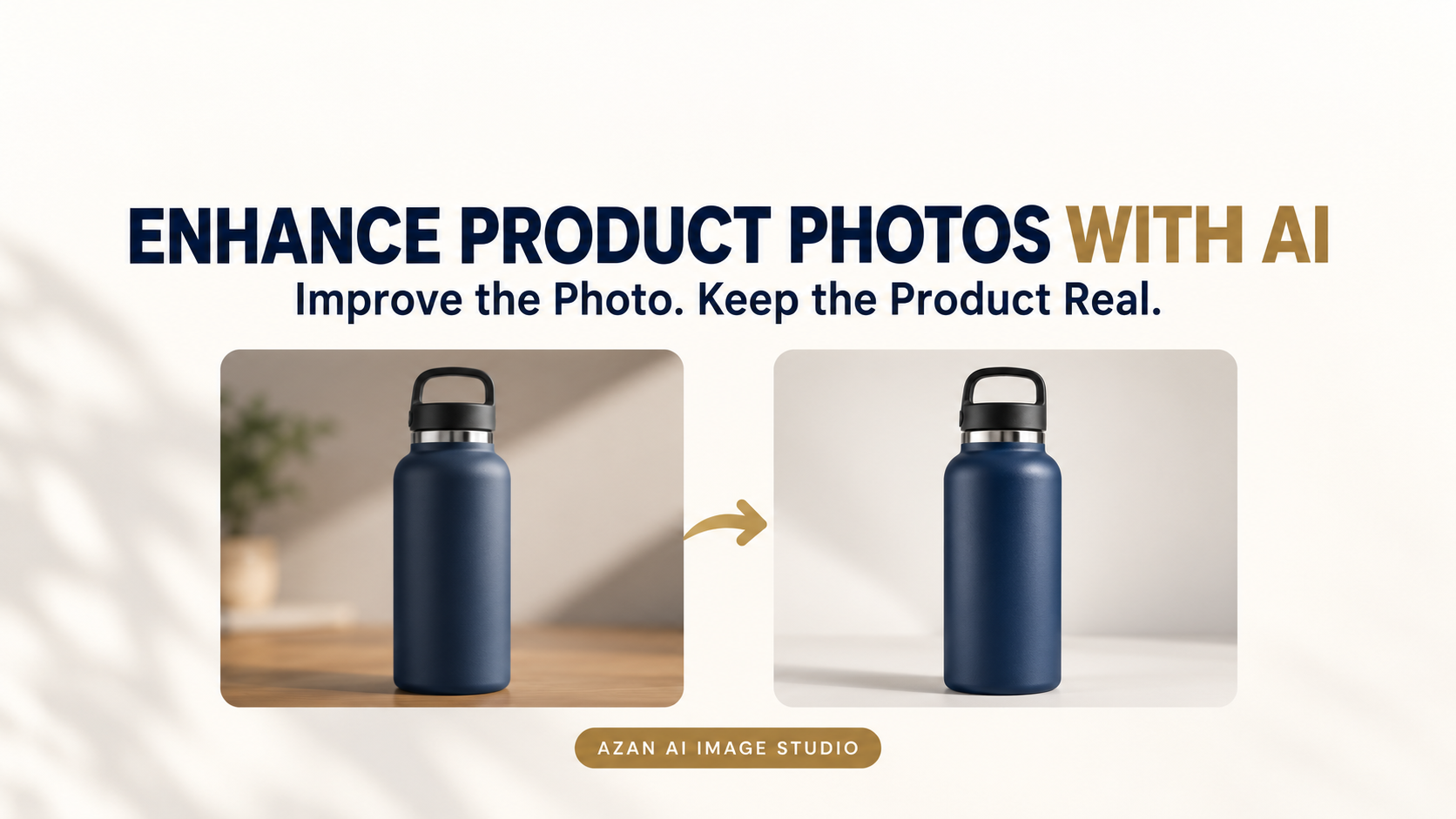
For example, imagine that you photograph a navy insulated bottle using your phone. The original image is slightly dark, and the bottle label is difficult to read.
AI enhancement may improve the lighting, sharpness, and contrast. However, it should not turn the bottle black, rewrite its label, change the lid, add a handle, or create accessories that are not included.
That difference is critical for ecommerce sellers.
Enhancement Is Not the Same as Product Generation
AI image enhancement and AI image generation are different processes.
Image enhancement starts with a real product photograph and improves its visible quality.
Image generation may create new objects, backgrounds, people, packaging, or product details.
Both processes can be useful, but sellers must be careful when creating product listing images. The final image should accurately represent the item the customer will receive.
If an attractive image shows something that is not included with the product, it can lead to:
- Customer complaints
- Negative reviews
- Higher return rates
- Product-not-as-described claims
- Listing suppression
- Loss of buyer trust
The safest approach is simple: use AI to improve the presentation, not to invent product features.
When Should You Enhance a Product Photo?
AI enhancement is useful when the original photograph is accurate but does not look polished.
Slightly Blurry Phone Photos
Minor softness caused by movement or imperfect focus may be improved.
However, AI cannot reliably recover important details that were never captured. If the image is severely blurred, it is better to take a new photograph.
Poor or Uneven Lighting
A good product can look cheap when photographed in a dark room or under harsh overhead lighting.
Enhancement can balance the exposure, improve visibility, and reduce distracting shadows while keeping the real product intact.
Dull or Inaccurate Presentation
Poor lighting can make colors look washed out or lifeless. Careful color correction can help the photograph match the physical product more closely.
Always compare the result with the real item. Do not increase saturation simply because brighter colors attract more attention.
Visible Noise or Grain
Photos taken in low light often contain digital grain. Reducing this noise can create a cleaner and more professional product image.
Inconsistent Catalog Images
If your product photographs were taken at different times, their lighting and contrast may not match.
Using a consistent enhancement workflow can make your catalog look more organized and professional across Amazon, Noon, Shopify, or Etsy.
When Should You Retake the Photograph Instead?
AI cannot fix every photography problem. You should take a new photograph when:
- The product is seriously out of focus
- Important parts are hidden or cropped
- The wrong color or variation is shown
- The product label is unreadable
- Reflections cover important details
- The original image is extremely small
- The product color is significantly inaccurate
- Included accessories are missing
- The camera angle distorts the product’s shape
- The photograph shows damaged or outdated packaging
AI should not be used to reconstruct information that the original photograph failed to capture.
In many cases, a new phone photograph taken beside a bright window will be more accurate than a heavily edited image.
How to Enhance Product Images with AI
Use the following workflow to improve product photographs while protecting their accuracy.
Step 1: Choose the Best Original Photograph
Start with the clearest and most accurate photograph available.
Confirm that it shows the correct:
- Product model
- Color or variation
- Packaging
- Quantity
- Accessories
- Logo and label
- Shape and proportions
A stronger original image usually produces a more reliable result.
Step 2: Keep the Original File
Never overwrite your original photograph.
Save the enhanced version as a separate file so you can compare the two images and return to the original if the AI changes an important detail.
A simple naming system can keep your files organized:
- bottle-navy-original.jpg
- bottle-navy-enhanced.png
- bottle-navy-amazon-main.jpg
This becomes especially useful when you manage dozens or hundreds of products.
Step 3: Enhance the Product Photo
Upload the original photograph to the Azan AI Product Photo Enhancer.
The tool improves lighting, sharpness, contrast, clarity, and ecommerce presentation while aiming to preserve the product’s materials, labels, geometry, and visible features.
Start with one representative image before processing the rest of your catalog.
Step 4: Compare the Before and After Images
Do not approve an enhanced image based only on how attractive it looks. Zoom in and compare it carefully with the original.
Check the following details:
- Has the product color changed?
- Is the logo still correct?
- Is the label text accurate?
- Has the product’s shape changed?
- Are buttons, seams, ports, and patterns preserved?
- Has anything been added or removed?
- Does the package quantity remain correct?
- Are the included accessories unchanged?
If the edited version misrepresents the product, do not upload it.
Step 5: Remove the Background When Necessary
Enhancing an image does not automatically make it suitable for use as a marketplace main image.
If the photograph still has a distracting background, use the Azan AI Background Remover to create a clean product cutout.
Inspect the edges carefully, especially around:
- Handles
- Cables
- Transparent materials
- Fine fabric
- Fur
- Feathers
- Reflective surfaces
The finished product should not have white halos, missing edges, or pieces of the original background.
Step 6: Resize the Image for Each Marketplace
Amazon, Noon, Shopify, Etsy, and social media platforms use different image sizes and layouts.
Use Azan AI Product Image Studio to prepare your finished photograph for the required marketplace or social channel.
Keep the product centered, clearly visible, and surrounded by balanced margins. Avoid stretching a very small image because artificial enlargement cannot create reliable product details.
Step 7: Review the Final Listing on Mobile
Preview the listing on both desktop and mobile before publishing it.
A photograph may look clear on a large monitor but become difficult to understand as a small search-results thumbnail.
Make sure that:
- The product is immediately recognizable
- Important details remain visible
- The product is not too small
- The image does not look overcrowded
- The correct variation is displayed
A Practical Product-Image Example
Suppose you sell a stainless-steel lunch box.
Your supplier photograph accurately shows the product, but it has dim lighting, a grey background, and weak contrast.
A safe enhancement workflow would be:
- Confirm that the model, compartments, lid, clips, and color are correct.
- Improve the photograph’s lighting, sharpness, and contrast.
- Compare every physical detail with the original image.
- Remove the grey background.
- Place the product on a clean, marketplace-sized canvas.
- Export separate versions for Amazon, Noon, Shopify, and social media.
- Check that no food, utensils, or accessories appear unless they are included or clearly used only as props in a secondary image.
The final photograph looks more professional, but the product remains truthful.
Common AI Product-Image Mistakes
Making the Product Look Unrealistically Perfect
Removing every texture, scratch, seam, or natural material variation can make the product look artificial.
Improve the photograph’s quality without removing genuine product characteristics.
Changing Product Colors
AI may adjust white balance or saturation. This can accidentally turn beige into white, navy into black, or muted gold into bright yellow.
Always compare the enhanced image with the physical item.
Allowing AI to Rewrite Labels
Small text can be difficult for image-editing systems to preserve.
Check brand names, measurements, ingredients, warnings, instructions, and packaging text carefully.
If the label is incorrect, use the original photograph or retake it instead of publishing inaccurate information.
Adding Features That Do Not Exist
Look closely for invented:
- Pockets
- Handles
- Buttons
- Patterns
- Cables
- Reflections
- Attachments
- Accessories
Even a small invented detail can create the wrong customer expectation.
Showing the Wrong Quantity
If the listing includes one item, the main image should not make customers think they will receive two or three.
Make sure the photograph accurately represents the quantity included in the purchase.
Using Lifestyle Images as Main Images
Lifestyle photographs can help buyers understand how a product is used, but marketplace main images usually have stricter requirements.
Use a clean, accurate product image as the main photograph. Place lifestyle scenes, feature graphics, size guides, and usage examples in suitable secondary-image positions.
Always check the latest image requirements for your marketplace and product category before uploading.
Final Product-Image Checklist
Before publishing an AI-enhanced photograph, confirm that:
- The image shows the actual product being sold
- The correct model and variation are displayed
- The product color is accurate
- Shape and proportions are unchanged
- Labels and logos are correct
- No false features were added
- No included item was removed
- Product quantity is represented accurately
- The image remains sharp at full size
- The product is clear as a small thumbnail
- The background suits the marketplace
- The dimensions meet current platform requirements
- You have kept a copy of the original photograph
Frequently Asked Questions
Can AI fix a blurry product photo?
AI can improve slight softness, digital noise, and weak contrast. It cannot reliably recover important details from a severely blurred photograph. Retaking the image is safer when product features are unclear.
Can I use AI-enhanced product images on Amazon?
AI-assisted editing may be used when the final photograph accurately represents the real product and complies with Amazon’s current image requirements. Always check the applicable marketplace and category rules before uploading.
Will AI enhancement change my product?
A carefully designed enhancement workflow aims to preserve the product, but every result still requires human review. Pay particular attention to colors, labels, small components, packaging, and product geometry.
Can I enhance supplier product images?
You may enhance supplier images when you have permission to use them and they accurately represent the product you sell.
Do not remove another company’s watermark or use copyrighted photographs without authorization.
What is the difference between enhancement and background removal?
Image enhancement improves qualities such as lighting, sharpness, contrast, and clarity.
Background removal separates the product from its surroundings and creates a transparent or clean-background image. Many ecommerce photographs need both processes.
Do better product images increase sales?
Clear and accurate images can improve buyer confidence and help customers understand the product. However, no image tool can guarantee higher rankings or sales.
Pricing, reviews, delivery speed, listing quality, competition, and customer service also influence performance.
Improve the Photo, Not the Product
AI makes professional-looking ecommerce images more accessible to smaller sellers.
The safest results come from a disciplined process: begin with a real photograph, improve only what is necessary, compare the result carefully, and reject any edit that changes the product.
Ready to improve your product photos?
Try the Azan AI Product Photo Enhancer and turn ordinary product shots into cleaner, marketplace-ready images—without misrepresenting what customers will receive.
Azan AI community
Join the Conversation
Was this guide useful?
Comments
Have a question or an idea to add? Share it with the Azan AI community.
Loading comments…
Reference: Blog #31 — quote this number if you contact us about this article