 Seller Playbook
Amazon & Noon Product Photos, Done Right: The Fast White-Background Workflow
By Muhammad Nadeem · Blog #5
Updated
📖 4 min read · 711 words
On Amazon and Noon, your main image does two jobs at once. It is the thumbnail a shopper decides on in a fraction of a second, and it is the one asset both marketplaces will reject a listing over if it breaks the rules. A busy background, a shadow, a stray prop, or the wrong dimensions can quietly hold a product back or get it suppressed entirely.
The fix is not a photo studio. It is a repeatable two-step workflow you can run on a phone snap or a supplier image, for one product or fifty. Here is exactly how it works.
If images are one part of a larger catalog workflow, compare the best AI tools for online sellers in 2026 for listing copy, localization, SEO, and packaging alongside photo preparation.
What Amazon and Noon actually require
Both platforms want the same core thing: the product, alone, on a clean white background. But the details differ.
| Requirement | Amazon | Noon |
|---|---|---|
| Background | Pure white (RGB 255,255,255) | Clean white |
| Size | 2000x2000 px recommended (enables zoom) | Square, high-resolution |
| Product | Fills about 85% of the frame | Centered, front-facing |
| Not allowed | Logos, watermarks, text, props | Borders, badges, promo text |
Get these right and your main image sails through. A clean, consistent white-background image is the single change most likely to lift click-through on a crowded search page.
The two-step workflow
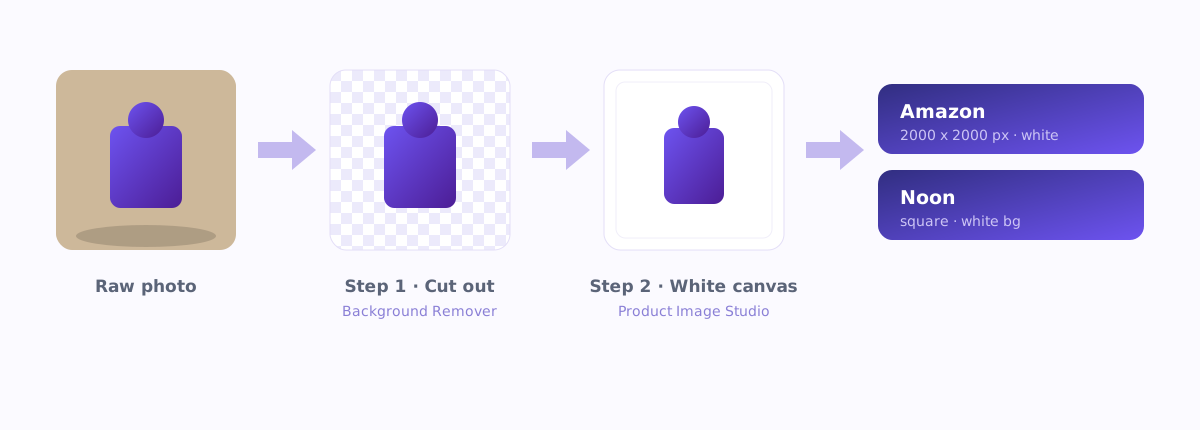
There is a common mix-up worth clearing up first: resizing to a white canvas and removing a background are two different jobs. You need both, in order.
Step 1 - Cut the product out
Start by removing the original background so you are left with the product on transparency. Use the Background Remover for everyday products with clean edges. For tricky subjects such as fabric, fur, glassware, or wispy and transparent edges, reach for the Smart Background Remover, which is built to handle those hard cases cleanly. The output is a transparent PNG: your product, nothing else.
Step 2 - Place it on a marketplace-ready white canvas
Now open Product Image Studio and pick the marketplace preset. Amazon, Noon, Shopify and more are built in. It sets the correct square dimensions, fills the canvas pure white (or keeps it transparent when you need that), and centers the product with even margins. One image, done to spec, with no manual cropping or guessing at pixel sizes.
Keep the two jobs straight: Product Image Studio resizes and sets the white canvas. It does not remove the background. That is Step 1's job. Run them in order and every image comes out clean and correctly sized.
Do it in bulk
The real time-saver is volume. Instead of editing SKUs one at a time, batch a set of product images through the same preset and get back a folder of marketplace-ready files in one pass. A catalog that used to eat an afternoon becomes a few minutes, and every image is consistent, which is exactly what a professional storefront looks like.
Avoid the common rejections
- Off-white or grey background. "Looks white" is not white; marketplaces check for true 255/255/255. A canvas fill removes the guesswork.
- Product too small or off-center. Fill roughly 85% of the frame and center it.
- Leftover shadows or props. These come from skipping the cut-out step. Remove the background first, then place on white.
- Wrong dimensions. A non-square or low-resolution main image gets downranked or rejected; match each marketplace's spec exactly.
Your pre-upload checklist
- Background is pure white (or transparent where required)
- Only the product is in frame, with no props, text, logos or watermarks
- Product centered, filling about 85% of the square
- Correct size: Amazon 2000x2000, Noon square and high-resolution
- Sharp focus and true-to-life color
- The same treatment across every SKU for a consistent storefront
Clean main images are not a nice-to-have on Amazon and Noon. They are the entry ticket and your first conversion lever. With a cut-out tool and a marketplace-preset resizer, you can hit the spec every time without a studio, a designer, or a wasted afternoon.
Azan AI community
Join the Conversation
Was this guide useful?
Comments
Have a question or an idea to add? Share it with the Azan AI community.
Loading comments…
Reference: Blog #5 — quote this number if you contact us about this article